WTF Is Layout Thrashing
What forced reflows are, why interleaving DOM writes and reads tanks your frame rate, and how to batch them.
Layout thrashing is when JavaScript repeatedly writes to the DOM and then reads layout-dependent properties in the same frame, forcing the browser to recalculate layout synchronously instead of batching it. Each read-after-write cycle is called a forced reflow, and when they happen dozens or hundreds of times per frame, your animation goes from 60fps to slideshow.
How the browser renders a frame
The browser pipeline for a single frame looks like this (and YOU should know this as the palm of your hand):
- JavaScript: your code runs: event handlers,
requestAnimationFramecallbacks, GSAP tweens, React commits. Any DOM mutations happen here. - Style: the browser matches CSS selectors to elements and resolves every property into a final
computed value. This one could be long if impacts too many elements. - Layout: with
computed stylesin hand, the browser calculates how much space each element takes up and where it sits on the page. This can be slow depending on the complexity the layout. - Paint: the browser records draw calls (fills, strokes, text, images) into display lists for each layer. This step is fast depending on the number of layers and the effects applied to them.
- Composite: the GPU takes the painted layers, applies transforms and opacity, and composites them into the final frame on screen.
Normally, Layout happens once per frame, after all JS has finished. The browser is smart, it batches DOM writes and computes layout once, right before painting.
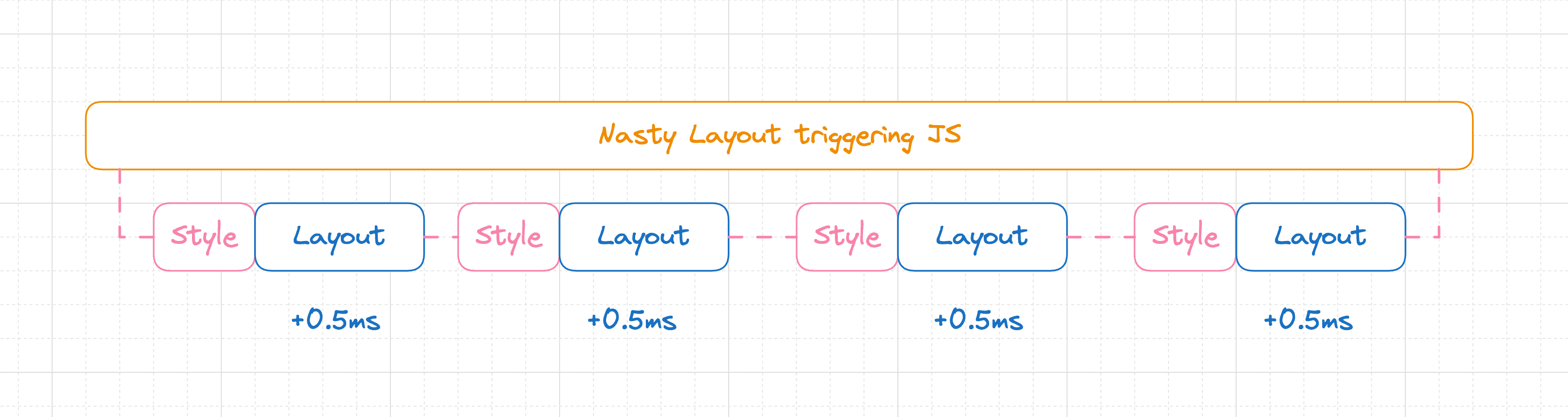
But there's a catch: if your JS writes to the DOM (invalidating layout) and then reads a layout-dependent property, the browser can't defer the computation. It has to stop everything, compute layout right now, and return the value. That synchronous detour is a forced reflow.
One forced reflow could be cheap. But if you do it in a loop (write, read, write, read) you force the browser to recalculate layout on every iteration, your fps tank down and there you have ✨ layout thrashing ✨.
What triggers it
Writes that invalidate layout (common examples):
- Setting
element.style.top,left,width,height - Setting
element.style.display,padding,margin element.setAttribute('d', ...)on SVG pathselement.classList.add(...)if it changes geometryelement.innerHTML = ...
Reads that force layout (common examples):
element.offsetTop,offsetLeft,offsetWidth,offsetHeightelement.getBoundingClientRect()getComputedStyle(element).top(or any layout-dependent property)element.scrollTop,scrollLeftelement.clientWidth,clientHeight- SVG's
getTotalLength(),getBBox()
If a write happens before a read in the same frame, the browser must synchronously recompute layout before it can answer the read. That's the forced reflow. Here's a minimal example:
const element = document.getElementById('element')
element.style.width = '230px' // <--- Style write, **invalidates layout**
const elmBounds = element.getBoundingClientRect() // <--- Layout read, **forces a synchronous reflow**
Note that the fact that we are asking for the same element's bounds after the style write is irrelevant, reflow will happen even if we ask for the bounds of other elements. This is because changing width of an element might push others to different positions in the document, which means that the browser needs to recalculate layout to answer any element read.
Rules of thumb
1. Separate reads from writes
If you need to read layout properties and write to the DOM, do all reads first, then all writes:
// GOOD: batch reads, then batch writes
const rect = element.getBoundingClientRect()  // read
const scroll = window.scrollY                  // read
element.style.transform = `translateY(${rect.top + scroll}px)`  // write

// BAD: interleaved reads and writes
element.style.top = '10px'                     // write
const height = element.offsetHeight            // read → FORCED REFLOW
element.style.top = `${height}px`              // write
const width = element.offsetWidth              // read → FORCED REFLOW AGAIN 😭
This example is pretty constrained tho. Codebases don't look like this, you have multiple files, multiple elements, and multiple stuff happening in the same frame. You'll need something like fastdom you help you orchestrate.
2. Mutate transforms, not layout properties
| Triggers layout (avoid these) | Compositor-friendly (prefer these) |
|---|---|
top, left, right, bottom | transform: translate() / GSAP x, y |
width, height | transform: scale() / GSAP scaleX, scaleY |
margin, padding | transform: translate() with visual offset |
font-size | transform: scale() for visual effect |
Doing this you'll avoid the browser invalidating layout during the current frame, which lowers the chance of thrashing by a lot if any other part of you code happens to read layout properties.
3. Avoid modifying DOM early in the rAF
Don't modify anything queryable from CSS at the start of your requestAnimationFrame callback. As soon as you write to a layout-affecting property, the browser schedules a Style Recalculation followed by a Layout Recalculation for the next frame, this is expected and fine on its own. The problem is that you're marking the layout as dirty too early in the pipeline, which means any layout read later in the same frame becomes a forced reflow (the browser has to resolve the impact of your DOM mutation before it can answer the read).
Most of the time this is completely avoidable, it's just a matter of orchestrating the order of your reads and writes.
Check for thrashing in DevTools
- Open Chrome DevTools → Performance tab
- Record a few seconds of interaction
- Look for purple Layout blocks in the flame chart
- If a Layout event has a "Forced reflow" warning and a stack trace, you've found thrashing
- The stack trace tells you exactly which JS line triggered the read
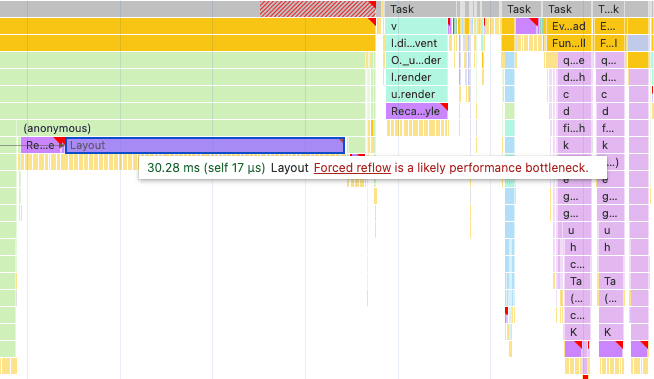
But tbh, hunting thrashing with the performance monitor is a pain in the ass. Is full of info and hard to explore with UI. We've built a skill for this which is pretty good at it since it uses grep to filter through the whole recording and goes specifically hunting for thrashing. If you combine it with no code minification and sourcemaps you can get a pretty good idea of what's going on.
The joyco studio team MIGHT also be working on a better tool for this. Join our discord to find out more.
Further reading
- What forces layout/reflow: Paul Irish's canonical list of properties that trigger layout
- Avoid large, complex layouts and layout thrashing: web.dev deep dive