Color Spaces sRGB & Linear
How sRGB encoding spends precision where your eyes care most, and why shader math must happen in linear space.
What sRGB is really doing
Your eyes are picky in the darks and dumb in the brights. You can easily spot the difference between two similar dark greys, but you barely notice the difference between two similar bright values.
When you bake information from a renderer like Blender's internal 32-bit float buffer (effectively continuous, "infinite" information) down to an 8-bit PNG, you're quantizing: choosing which 256 values to keep out of that smooth gradient. You need a strategy for where to spend those 256 slots.
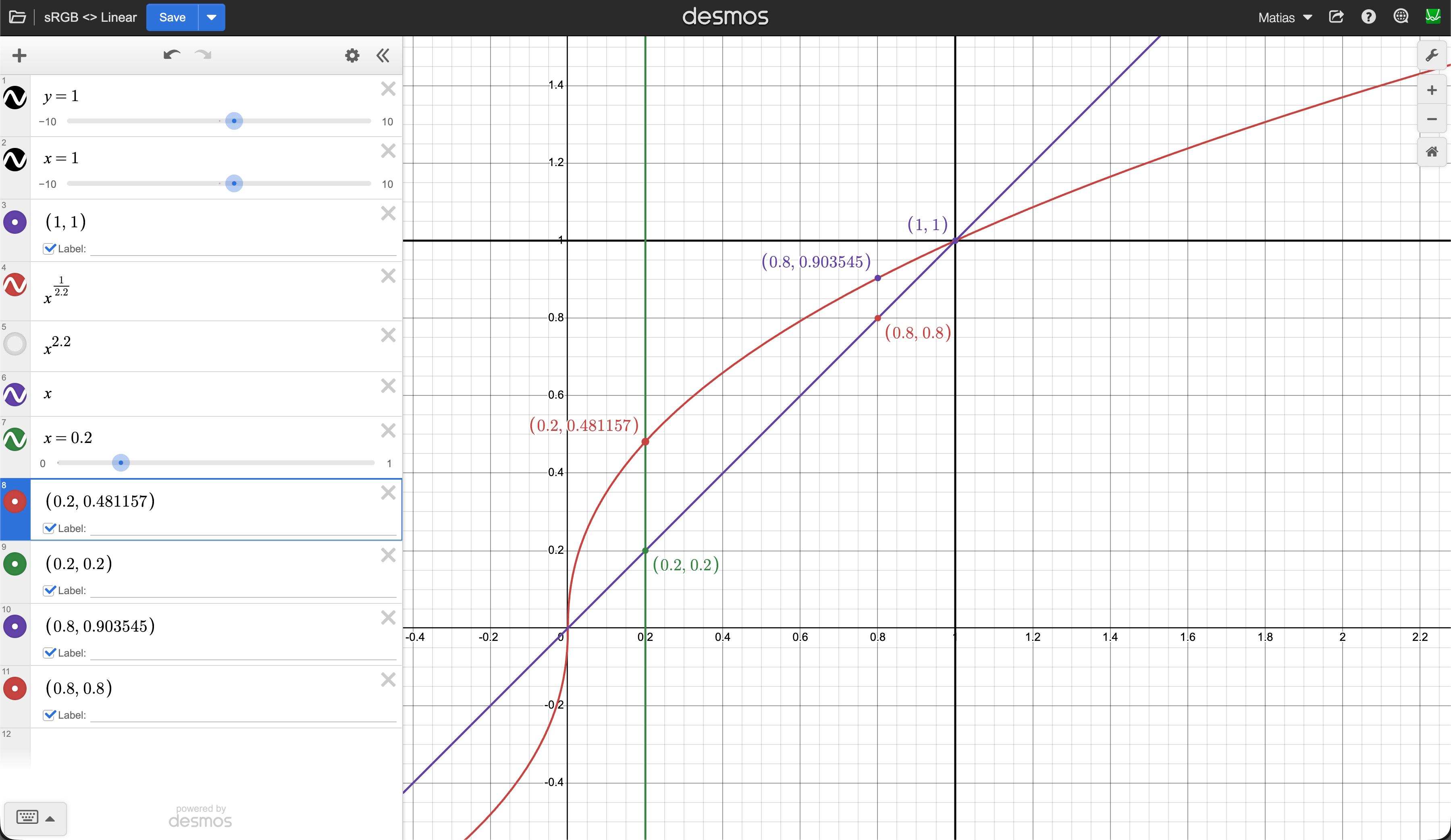
sRGB encoding is that strategy. It applies a curve (x^(1/2.2)) that pumps darker values to brighter ones, spreading darks into a wider portion of each channel's 0–255 space, and then gradually reduces the precision towards brighter colors where your eye won't notice. The bottom 20% of actual light intensity ends up occupying roughly half of the available steps (about 122 out of 256 values) while the brights get squeezed into fewer steps.
The contract is simple: the file stores this "pumped up" version, and the display applies the inverse curve (x^2.2) to push everything back down to the correct brightness. The two curves cancel out and you see the original linear light.
How does it look like?
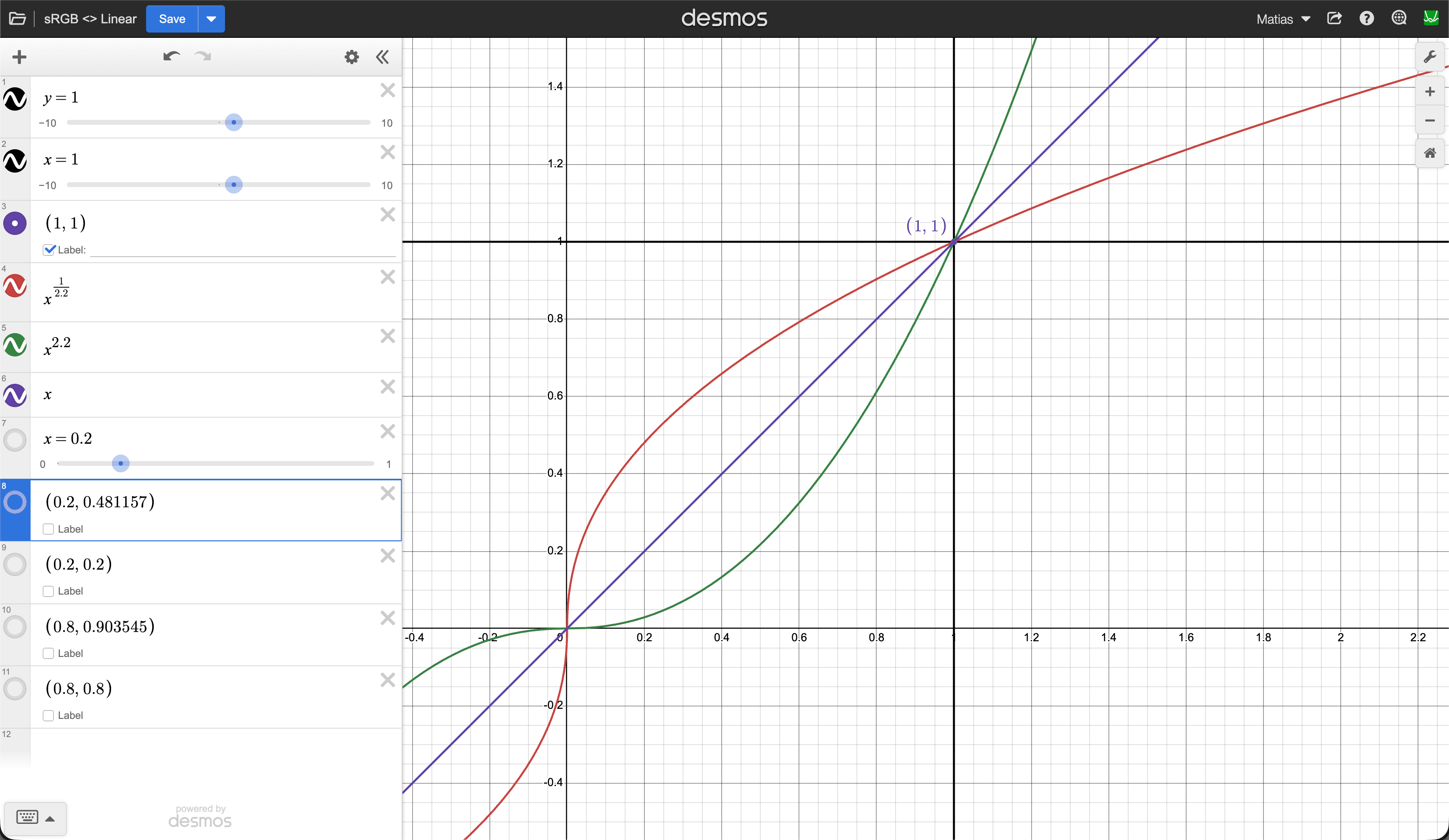
Keep in mind that the "Decode" fn is applied to the encoded curve. This means that it flattens it again converting sRGB to Linear. It's the inverse operation.
What happens if you DON'T convert sRGB to Linear?
If at display time you don't apply the inverse x^2.2 decode curve, you see the pumped-up values as-is. Everything looks washed out, shadows look milky and flat, contrast disappears, and the image feels like someone threw a grey fog over it. Because that encoding curve lifted all the darks toward the midrange, without the decode pushing them back down you lose all the richness in the shadows.
This also matters because math on colors only makes sense in linear space. If you multiply two sRGB-encoded values, you get wrong results (the curve distorts the math).
That's why Three.js has texture.colorSpace = SRGBColorSpace, it tells the pipeline to decode (linearize) the texture before shader math. And renderer.outputColorSpace = SRGBColorSpace tells it to re-encode the final result back to sRGB so the display produces the correct brightness.
The full pipeline looks like this:
🖼️ sRGB texture → 🎛️ decode to linear (input) → 👾 shader math in linear → 🎛️ encode back to sRGB (output) → 🖥️ monitor decodes → 🖼️ correct image
So where does the extra precision go after decoding?
There was never "extra precision." The moment you baked from a high-precision source (like Blender's 32-bit float buffer) down to 8-bit in the sRGB color space, you chose to represent more dark colors than bright ones. You defined a store of 256 values that has finer steps between dark grays and coarser steps between bright ones.
When the GPU decodes back to linear, those 122 dark values get mapped back into the 0.0–0.2 range, you don't magically get the in-between values back. You just get 122 unevenly spaced points instead of the ~51 evenly spaced ones you would have gotten with linear storage. The distribution was decided at bake time, and decoding simply restores the original spacing.
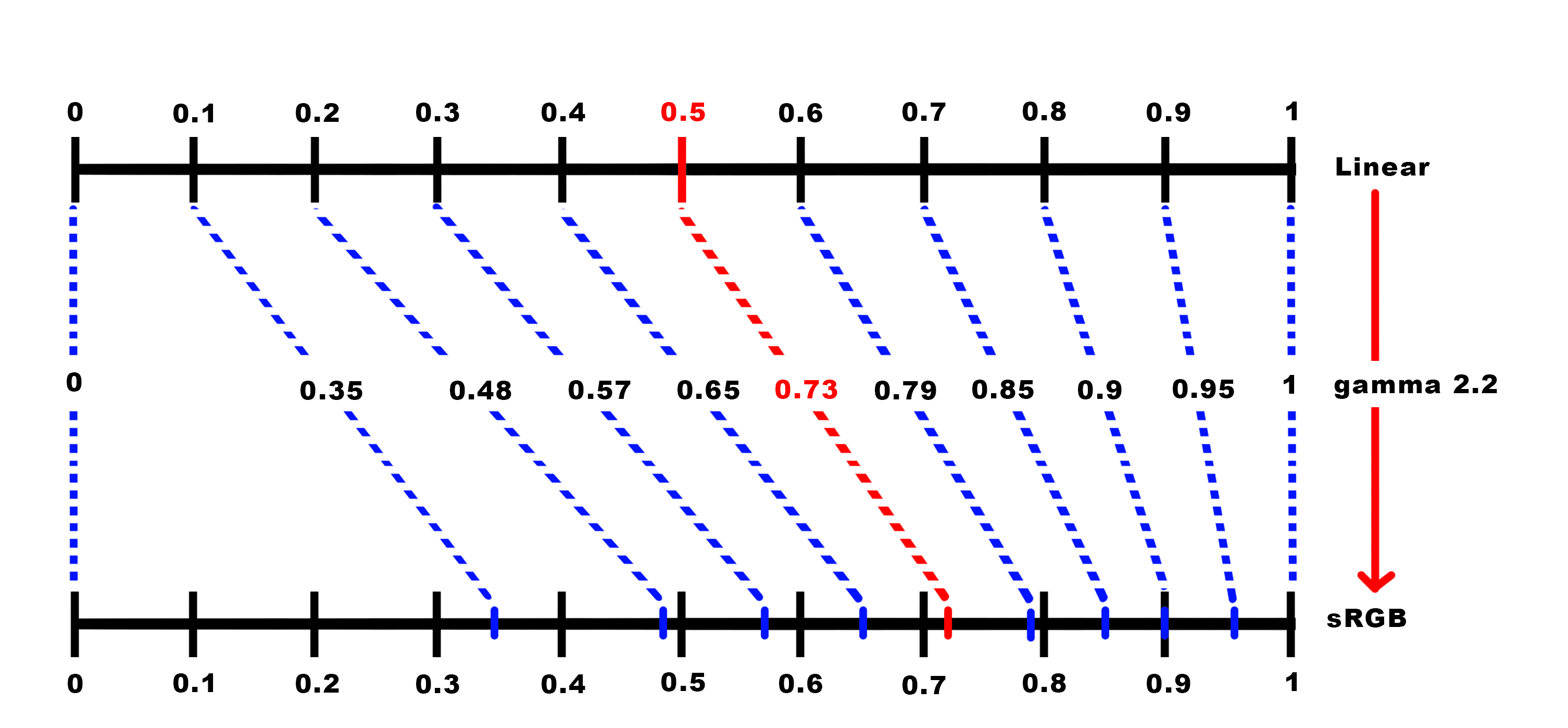
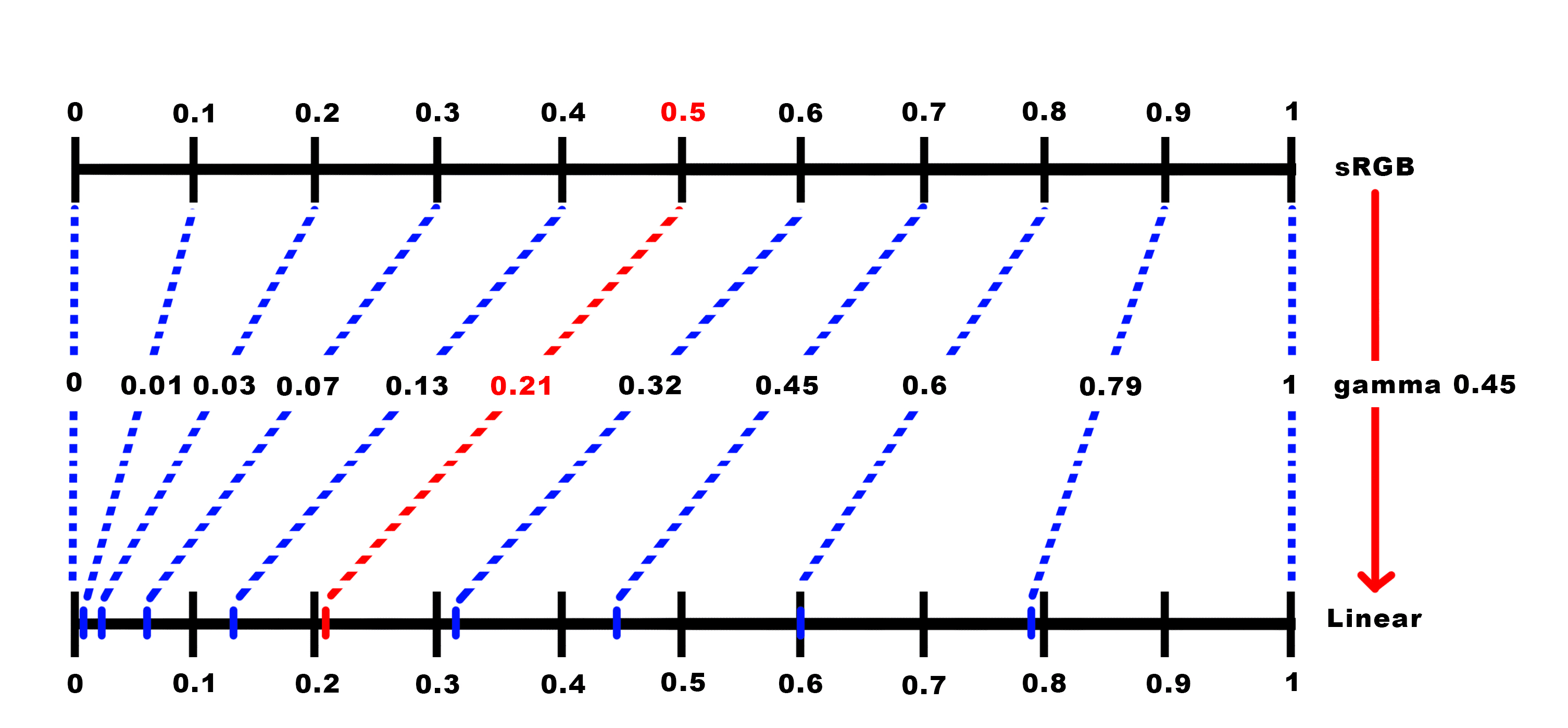
It's like pouring water from a small bottle into a big tank, the tank can hold way more, but you only have the water you brought. The GPU gives you a 16-bit float container with room for tens of thousands of distinct values, but you're only filling it with the 256 you packed at bake time. The extra capacity of the container doesn't create new data, it just holds your quantized samples with more breathing room between them. Which points in the broad color space get displayed at the end depends on the ones you stored in the first step. And that depends on the strategy you chose, sRGB is just one of the options. And now that you understand sRGB, meet the underlying concept: gamma.
Extra: So what is gamma?
Gamma is the general concept, sRGB is just one specific implementation of it. Gamma means "apply a power curve to the values." Any transfer function of the form y = x^γ where γ is some exponent is a gamma curve. You can pick any exponent you want: 1.8, 2.0, 2.2, 3.0, whatever. Different exponents redistribute the 256 slots differently, giving you more or fewer steps in the darks vs brights. sRGB happens to use something very close to γ = 2.2, but it's just one specific curve the industry standardized on because it turned out to be a good sweet spot for general purpose content on consumer displays.
That's what some games are letting you configure when they show a "gamma" or "brightness" slider with an image saying "adjust until the logo is barely visible." Even though sRGB assumes a ~2.2 decode curve, not every monitor actually hits that perfectly. A cheap panel might behave more like 2.0, an older TV might be closer to 2.4. The slider lets you adjust so the game's output matches what your screen actually does, making sure the darks land where the developers intended.
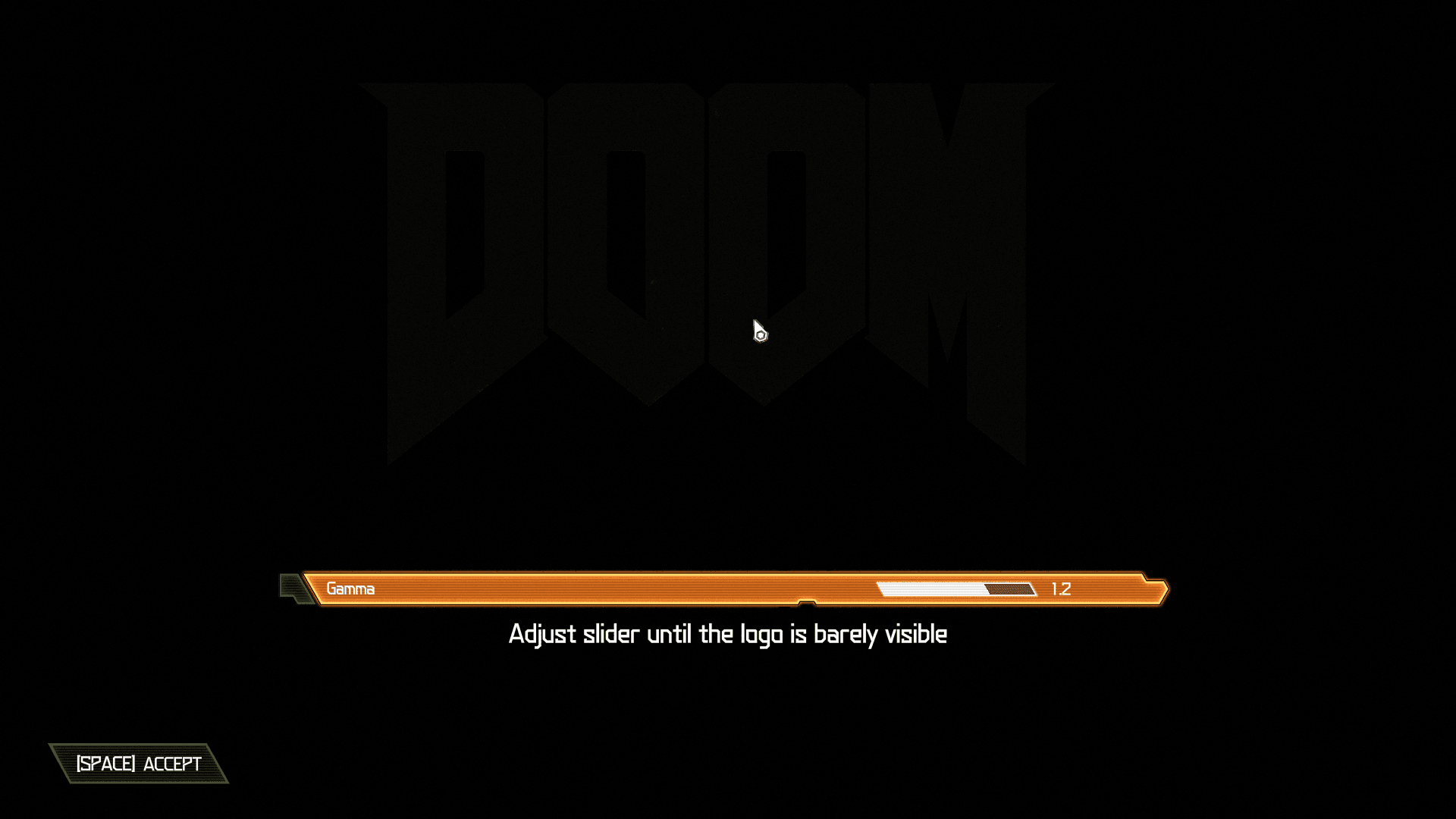
But wait, weren't the game textures already baked in sRGB?
Yes, and that decision is locked in. The gamma slider isn't changing what's stored in the textures. It's tweaking the final encode curve at the very end of the pipeline, right before the pixels hit the screen. The bake-time decision (how your 256 slots were distributed) happened once and it's done. The game-time adjustment is only compensating for your specific monitor. If your panel's actual decode curve is a bit off from the assumed 2.2, the game nudges its output encode so the two still cancel out correctly. Same contract as before, encode and decode should cancel, but now fine-tuned to the piece of glass you're looking at.
That's why those calibration screens always focus on dark values: "can you see the shape in the shadow?" because that's exactly where a mismatched gamma is most visible.
The full pipeline with this adjustment looks like:
🖼️ sRGB texture → 🎛️ decode to linear (input) → 👾 shader math in linear → 🎛️ encode with user-adjusted gamma (output) → 🖥️ monitor decodes → 🖼️ correct image
The game's gamma slider lives right there at the "encode with user-adjusted gamma" step. Everything before it (the texture data and the shader math) stays the same regardless of what monitor you're using. Only the final encode gets nudged so the round-trip lands correctly on your specific display.